한 줄 요약
2Mail2Do는 Gmail로 들어오는 메일을 주기적으로 스캔해서 “할 일(Action Item)” 메일과 일반 메일(Non-action)을 자동 분리하고,
Action 메일은 Todoist Task + Google Sheets 로그 + Google Calendar 이벤트를 한 번에 생성/동기화하는 엔드투엔드 자동화 에이전트입니다. :contentReference[oaicite:1]{index=1}
- Supplementary(Notion): 2Mail2Do — Supplementary Material :contentReference[oaicite:2]{index=2}
- Demo video(YouTube): mBjpdEz1JY0 :contentReference[oaicite:3]{index=3}
1) 문제 정의
업무 메일은 “정보”와 “요청/의무(할 일)”가 섞여 들어오고, 스레드가 길어질수록 중요한 요청이 묻힙니다.
2Mail2Do는 이 문제를 “메일을 읽는 일”이 아니라 “행동(Action) 단위로 쪼개는 일”로 재정의하고, 아래를 자동화합니다. :contentReference[oaicite:4]{index=4}
- 메일이 Action인지 판단 (
is_action_item) - Todo 한 줄 요약 생성 (
action_summary) - 마감일 추출 (
due_date) - 생성된 Todo가 어디서 완료되든(답장/Todoist 직접 완료) 로그/상태가 끝까지 동기화
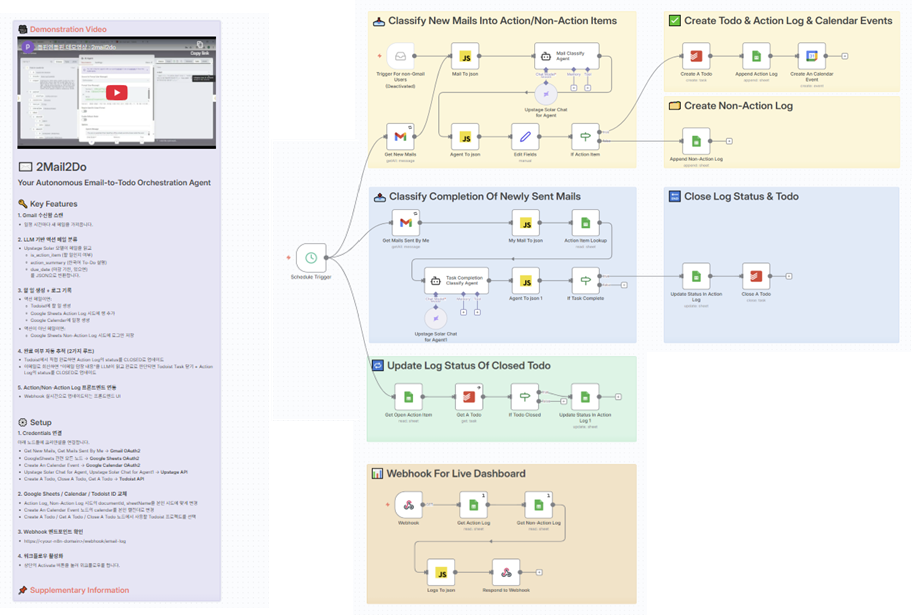
2) 전체 아키텍처 (n8n Orchestration)
메일 1통을 기준으로, Gmail → LLM → Todoist/Sheets/Calendar → Webhook API → Dashboard까지 한 번에 이어지는 구조입니다. :contentReference[oaicite:5]{index=5}
3) 워크플로우 1 — 새 수신 메일 분류 → Todo/로그/캘린더 생성
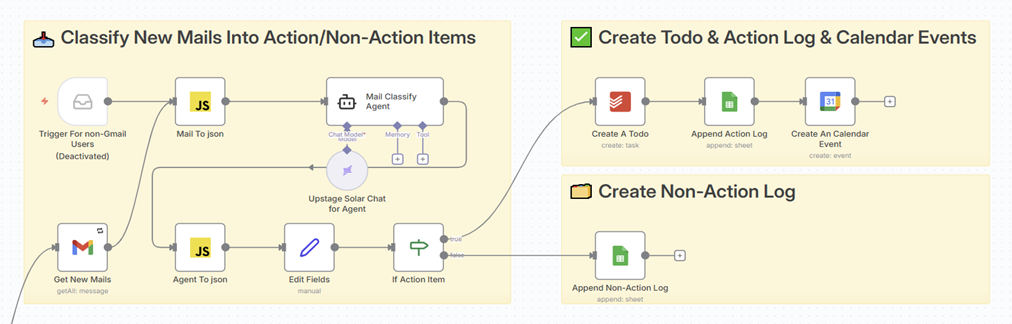
3.1 흐름 요약
Schedule Trigger
→ Get New Mails
→ Mail To json (HTML → 텍스트 정리)
→ Mail Classify Agent (Upstage Solar-Pro2)
→ Agent To json (엄격 JSON 파싱)
→ Edit Fields (thread_id, subject, from, received_at, gmail_link, action_summary, due_date 등 정리)
→ If Action Item
- True:
Create A Todo→Append Action Log→Create An Calendar Event - False:
Append Non-Action Log:contentReference[oaicite:6]{index=6}
3.2 핵심 노드 설명
(1) Mail To json — 이메일 본문 전처리 (HTML → Plain text)
- LLM이 읽기 좋게
<br>,<p>등을 줄바꿈으로 정리하고, 나머지 태그를 제거하여cleanText를 구성합니다. (전처리 후 프롬프트 입력에 사용)
(2) Mail Classify Agent (Upstage Solar-Pro2) — Action 판단 + 요약 + 마감일 추출
- “업무용 액션 판단기”로 동작하도록 규칙/예시가 매우 상세한 System/Prompt로 구성되어 있습니다. :contentReference[oaicite:7]{index=7}
- 출력 스키마는 아래 3개 필드만 허용:
is_action_item: true/falseaction_summary: 한국어 Todo 문장(액션일 때만)due_date: ISO-8601(+09:00) 또는 null
(3) Agent To json — LLM 출력 방어적 파싱
- 코드펜스 제거,
{ ... }구간만 추출, JSON 파싱 실패 시 명시적 throw로 워크플로우 안정성을 확보합니다. :contentReference[oaicite:8]{index=8}
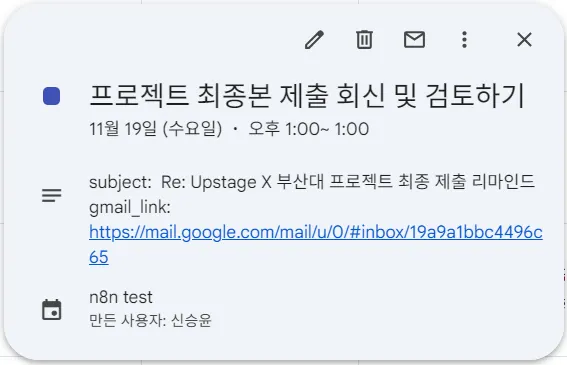
(4) Create An Calendar Event — 마감일을 캘린더 이벤트로 생성
- Action 메일의
due_date를 그대로 start/end로 사용하고, description에subject/gmail_link를 저장해 “클릭해서 바로 원문”으로 점프할 수 있게 합니다. :contentReference[oaicite:9]{index=9}
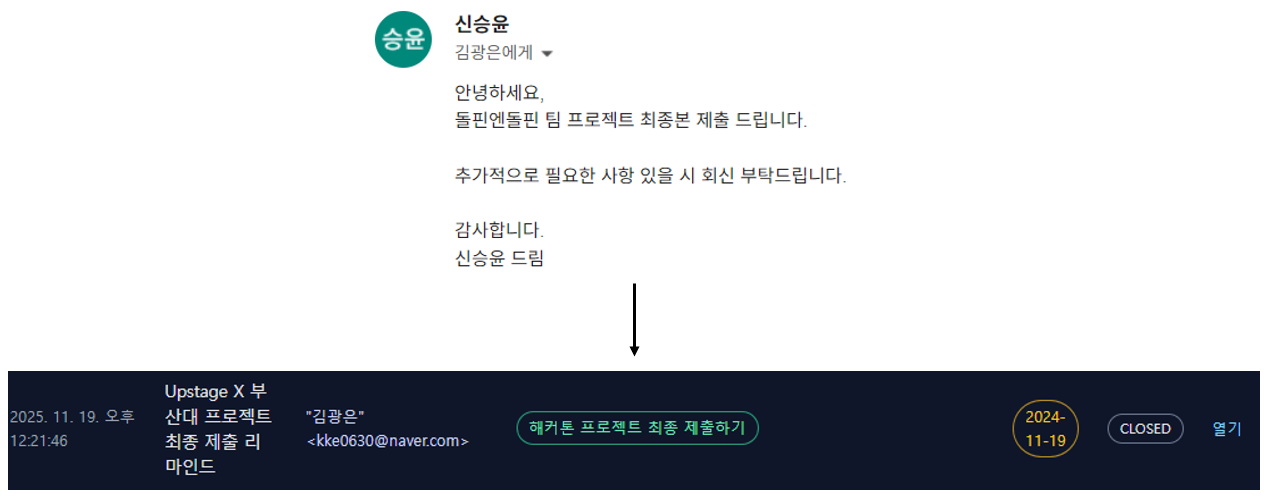
4) 워크플로우 2 — 내가 보낸 답장 메일 → “진짜 완료” 판정 → 자동 Close
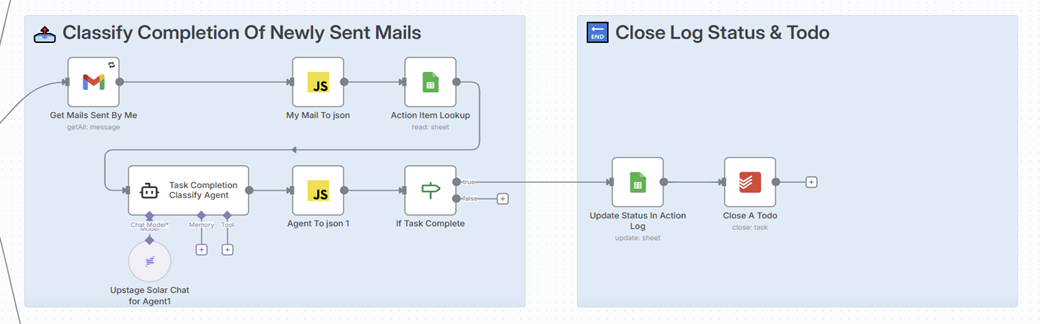
4.1 흐름 요약
Schedule Trigger
→ Get Mails Sent By Me (sender 필터로 “내가 보낸 메일”만)
→ My Mail To json
→ Action Item Lookup (thread_id + OPEN 상태 Action Log 검색)
→ Task Completion Classify Agent (Upstage Solar-Pro2)
→ Agent To json 1
→ If Task Complete
- True:
Update Status In Action Log→Close A Todo:contentReference[oaicite:10]{index=10}
4.2 보수적(Conservative) 완료 판정 프롬프트
- 완료로 간주할 표현(“제출했습니다/보내드립니다/처리했습니다”)과
완료로 보면 안 되는 표현(“알겠습니다/나중에 하겠습니다/추가 질문”)을 분리해 애매하면 무조건 완료로 보지 않도록 설계했습니다. :contentReference[oaicite:11]{index=11}
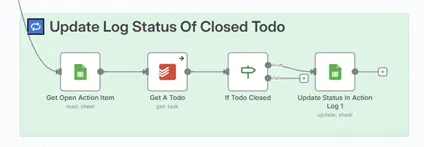
5) 워크플로우 3 — Todoist에서 직접 완료한 작업도 로그에 자동 동기화
사용자가 Todoist에서 먼저 완료를 눌러도, Action Log의 status가 자동으로 CLOSED로 따라오게 만들었습니다. :contentReference[oaicite:12]{index=12}
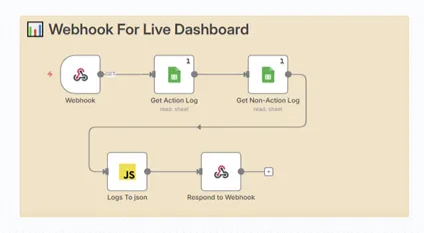
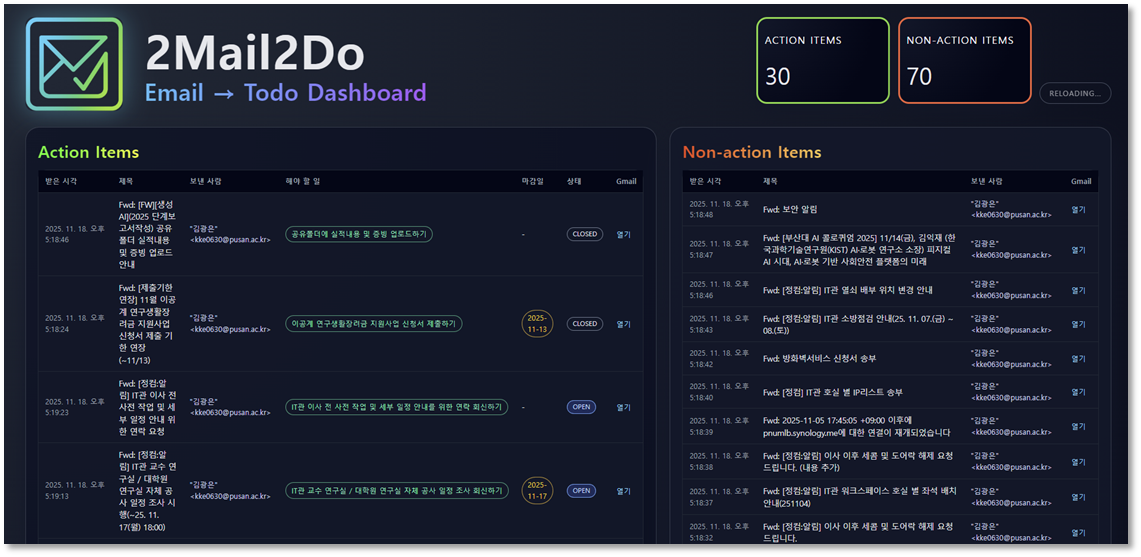
6) 워크플로우 4 — Webhook 기반 로그 조회 API → Live Dashboard
/webhook/email-log 호출 시,
- Action Log / Non-Action Log 시트를 읽고
{ actionItems, nonActionItems }형태로 합쳐- CORS 헤더 포함 JSON으로 응답합니다. :contentReference[oaicite:13]{index=13}
7) 로그 데이터 모델 (Google Sheets)
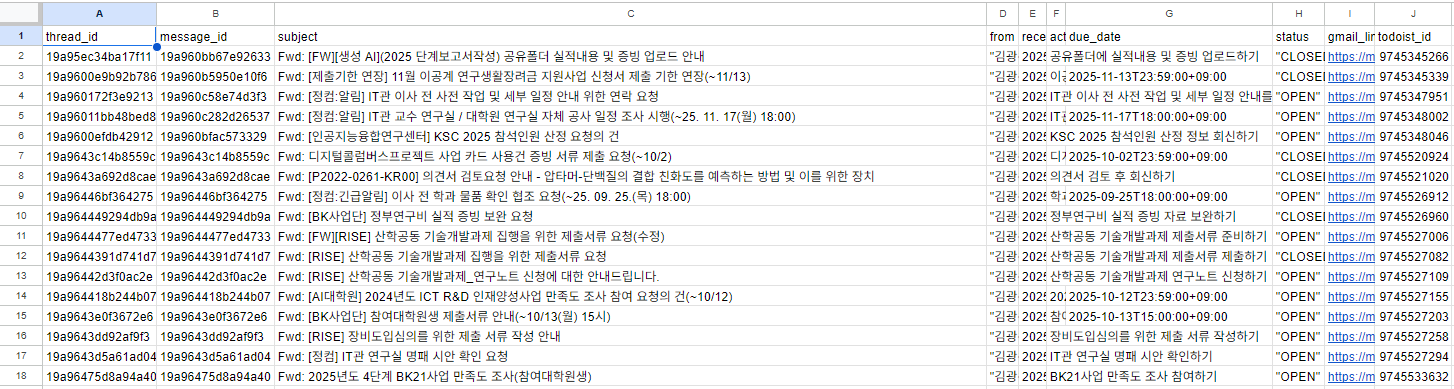
Action Log 시트는 최소 아래 필드를 유지합니다.
thread_id,message_idsubject,from,received_ataction_summary,due_datestatus(OPEN/CLOSED)gmail_link(원문 바로가기)todoist_id(Todoist task id)
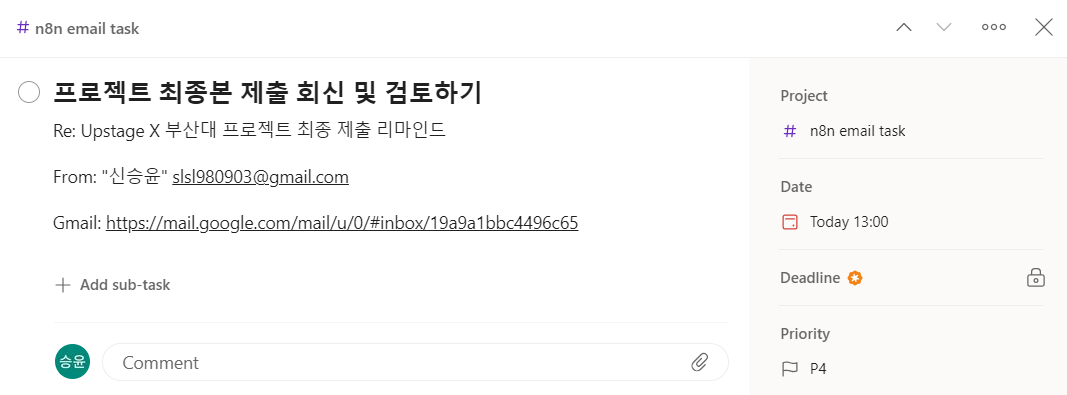
8) 결과 예시 (메일 → Todo/Calendar → 상태 종료)
9) 성능 평가 (LLM Action 분류)
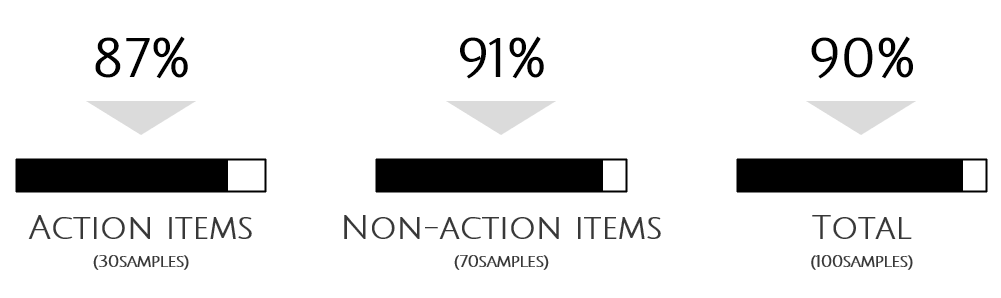
실제 업무용 Gmail 계정에서 연속된 메일 100건을 그대로 추출하고, 사람이 Action/Non-Action 이진 라벨링을 부여해 측정했습니다. :contentReference[oaicite:14]{index=14}
- Accuracy: 90% :contentReference[oaicite:15]{index=15}
- Action(True) 기준: Precision ≈ 86.7%, Recall ≈ 81.3%, F1 ≈ 83.9% :contentReference[oaicite:16]{index=16}
- Non-action(False) 기준: Specificity ≈ 94.1% :contentReference[oaicite:17]{index=17}
10) 워크플로우 안정성(End-to-End) 확인
n8n 워크플로우에 100개 메일을 한 번에 주입했을 때, 중단 없이 마지막 노드까지 정상 실행되었고,
Action으로 판정된 메일에 대해 Todoist/시트/캘린더 생성이 항목별로 일치하는지 수동 검증까지 수행했습니다. :contentReference[oaicite:18]{index=18}
11) 향후 개선 방향
- MODEL: 조직/팀의 실제 로그 기반 Prompt Learning & Fine-Tuning Loop :contentReference[oaicite:19]{index=19}
- INTEGRATIONS: Gmail을 넘어 IMAP/Outlook, Slack/Teams/Notion/Jira 등으로 확장 :contentReference[oaicite:20]{index=20}
- ANALYTICS: org-level 이메일 분석 대시보드(처리속도, 카테고리 비중, 병목 탐지 등) :contentReference[oaicite:21]{index=21}
Supplementary Material
더 상세한 노드 구성/설명/이미지는 아래 노션 페이지에 정리해 두었습니다.
- 2Mail2Do — Supplementary Material :contentReference[oaicite:22]{index=22}